




What Is YouTube’s Content ID? A Complete Guide for Creators
You upload a video to YouTube, add some music to it, and publish it.
A few minutes later, you receive a notification saying your video has a Content ID claim.
But what does that actually mean?
Does it mean you have broken copyright law? Will your video be taken down? Will your channel get a copyright strike? What happens to your video's monetisation? And what if you actually have a licence to use the music?
These are common questions for creators, especially when using copyrighted music in YouTube videos.
This is where YouTube Content ID comes in.
In this guide, we’ll explain what Content ID is, how it works, what happens when YouTube detects copyrighted music, what a Content ID claim means, how it differs from a copyright strike, and what creators should do if they receive a claim.
What Is YouTube Content ID?
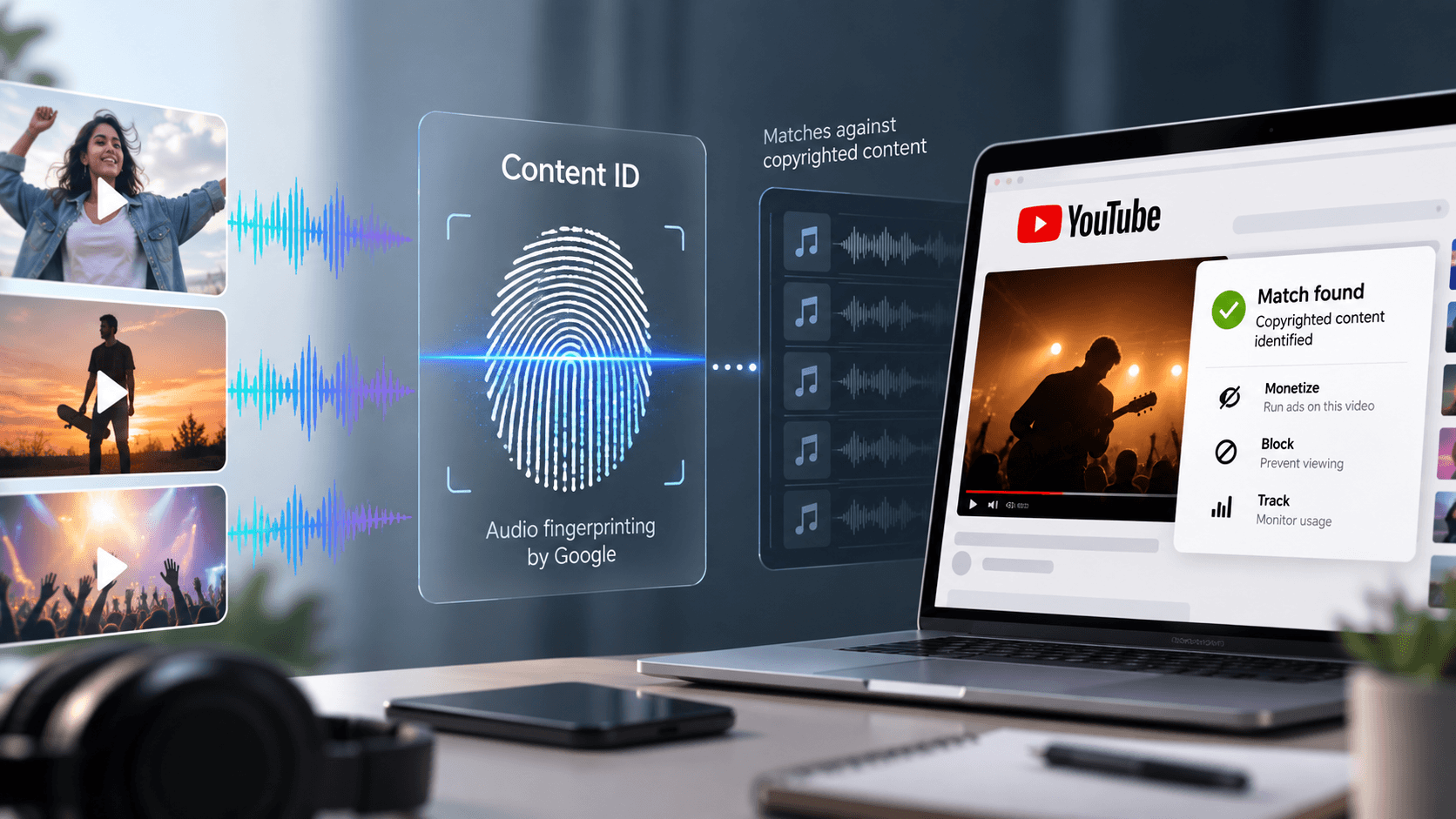
Content ID is YouTube’s automated system for identifying and managing copyrighted content on the platform.
In simple terms, YouTube checks uploaded videos against a database of audio and visual reference files provided by copyright owners.
When you upload a video, YouTube can automatically scan it to check whether parts of the video match copyrighted content in its Content ID system.
Think of it like a matching system:
You upload a video → YouTube scans it → Content ID checks for matches → A match is found → A Content ID claim may be created
For example, if you add a copyrighted song to your YouTube video and that recording is part of a copyright owner’s Content ID reference library, YouTube may detect the music automatically.
Why Does YouTube Scan Your Videos?
Copyright owners can provide YouTube with reference files of content they own. These can include audio and visual files.
YouTube uses these reference files to identify matching content in videos uploaded to the platform. The system is designed to help eligible copyright owners manage their copyrighted material on YouTube.
This means creators do not necessarily need to receive a manual notification from a copyright owner for copyrighted music to be identified.
The detection can happen automatically when the video is uploaded.
How Does Content ID Work?
The process is fairly straightforward.
Step 1: You Upload Your Video
You upload a video to YouTube containing your original footage, music, sound effects, or other content.
Step 2: YouTube Scans the Video
YouTube automatically scans uploaded videos using its Content ID system.
Step 3: Content ID Looks for Matches
The system compares the uploaded content against reference files submitted by copyright owners.
Step 4: A Match May Be Detected
If YouTube finds a match with content in the Content ID database, the video can receive a Content ID claim.
Step 5: The Copyright Owner’s Policy Is Applied
What happens next depends on the policy selected by the copyright owner.
The main policies are:
Block: The video may be blocked from being viewed.
Monetise: Ads may be shown on the video and, in some cases, revenue may be shared with the uploader.
Track: The copyright owner can track the video's viewership statistics.
These actions can also vary by country or region. For example, a video may be monetised in one country and blocked or tracked in another.
What Is a Content ID Claim?
A Content ID claim is generated when YouTube’s system identifies a match between uploaded content and copyrighted material in its Content ID system.
For example, if your video contains a song that matches a reference file submitted by a copyright owner, the system can generate a claim.
A claim does not automatically mean that your video has been taken down.
The copyright owner’s selected policy determines what happens to the claimed video. It may be blocked, monetised, or tracked.
Content ID Claim vs. Copyright Strike
This is one of the most important things creators should understand.
A Content ID claim is not the same as a copyright strike.
A Content ID claim is generated through YouTube’s automated matching system when copyrighted content is detected.
A copyright strike can result from a valid copyright removal request, also known as a takedown.
So:
Content ID claim = YouTube detects a match
Copyright removal request = A rights holder requests that the content be removed
Copyright strike = A consequence of a valid copyright removal request
YouTube specifically distinguishes Content ID claims from copyright removal requests and copyright strikes.
In most cases, a Content ID claim affects the particular video rather than your entire channel or account.
What Can Happen to Your Video After a Content ID Claim?
A claim can have different consequences depending on the copyright owner’s policy.
1. Your Video Can Be Blocked
The copyright owner can choose to block the video from being viewed.
Blocking can also be limited to particular countries or regions.
2. Your Video Can Be Monetised
The copyright owner can choose to monetise the video by running ads against it.
In some cases, revenue may be shared with the uploader.
For music claims, monetisation is a commonly used policy.
3. Your Video Can Be Tracked
The copyright owner can choose to track the video’s viewership statistics instead of blocking it.
The exact outcome depends on the copyright owner’s settings and can vary by location.
Does a Content ID Claim Mean You Cannot Use the Music?
Not necessarily.
A Content ID claim tells you that YouTube has detected a match. It does not, by itself, tell you whether your use of that music is authorised.
For example, you may have obtained a licence that gives you permission to use a particular song under specific conditions.
This is why creators need to understand the difference between copyright detection and permission to use music.
Content ID is a detection and rights-management system.
A music licence is what gives you permission to use music according to the terms of that licence.
What If You Have a Music Licence?
This is particularly important for creators who use licensed music.
You can have a valid licence to use a song and still have YouTube’s automated system detect that song in your video.
Why?
Because Content ID is designed to identify matches. It does not automatically know about the specific licence or permission you may have obtained separately.
If you receive a claim on content that you are authorised to use, your licence documentation can be important when addressing the claim.
This is why creators should always keep relevant licensing information, such as their licence details, receipts, or other proof of permission.
How Can Creators Check a Content ID Claim?
If YouTube detects a Content ID claim, you can check the details in YouTube Studio.
On desktop:
YouTube Studio → Content → Claims / Restrictions → See Details
You can check information such as:
Which video has been claimed
What content has been identified
Who made the claim
What part of the video was matched
What action has been applied to the video
YouTube also notifies creators when their video receives a Content ID claim.
What Should You Do If You Receive a Content ID Claim?
Don’t panic.
A claim does not automatically mean your channel has received a strike.
Instead, start by understanding what has been claimed and why.
1. Check the Claim
Open the claim details in YouTube Studio and identify the music or other content that has been matched.
2. Check the Claimant
Look at who has claimed the content.
YouTube provides information about the claimant and the content that was identified.
3. Check Your Rights
Ask yourself:
Do I own this content?
Do I have permission to use it?
Do I have a valid music licence?
Does my licence cover YouTube?
Does it cover the way I am using the music?
4. Keep Your Licence Proof
If you have licensed the music, keep the relevant documentation.
This can help demonstrate that your use of the music is authorised under the applicable licence terms.
5. Take the Appropriate Action
If the claim is valid, you may choose to leave it as it is.
If you believe the claim is incorrect and you have the necessary rights, YouTube provides options to dispute a claim.
However, creators should only dispute a claim when they have a valid reason and the necessary rights. An invalid dispute can potentially lead to a copyright removal request.
Can You Get Multiple Content ID Claims?
Yes.
A video can receive claims from different copyright owners for different parts of the content.
Claims can also vary by country or region if different rights holders control rights in different territories.
This is another reason why understanding the rights behind the music you use is important, especially for commercial or professional content.
Who Can Use YouTube Content ID?
Content ID is not simply a system that any creator can use to claim other people’s videos.
YouTube makes Content ID available to copyright owners who meet specific eligibility requirements.
According to YouTube, copyright owners generally need to own exclusive rights to a substantial body of original material that is frequently uploaded to YouTube.
YouTube also monitors how Content ID is used. Copyright owners who repeatedly make erroneous claims can lose access to Content ID and potentially their partnership with YouTube.
For creators, the important point is that Content ID is a copyright management system used by eligible rights holders, not a tool available to every YouTube user.
How Can Creators Avoid Music Copyright Problems?
The best approach is to understand your music rights before publishing your video.
Before using a song, check the following:
1. Where Can You Use the Music?
Make sure the licence covers YouTube if you are publishing the content there.
2. What Type of Content Are You Creating?
Check whether the licence covers personal, sponsored, branded, promotional, or commercial use, depending on your content.
3. What Does the Licence Actually Allow?
Don’t assume that a song being labelled “licensed” or “royalty-free” means you can use it anywhere.
Always check the actual licence terms.
4. Do You Have Proof?
Keep your licence, receipt, or other relevant licensing information.
5. What Happens If You Receive a Claim?
Know where to find your claim details and have your licensing information ready.
Being prepared is much easier than trying to figure out your music rights after a copyright issue occurs.
How Hoopr Helps Creators Use Licensed Music
This is where Hoopr can make the process easier.
Instead of finding a song online and trying to figure out whether you have the necessary rights to use it, creators can discover licensed music through Hoopr.
To learn more about music licensing, read our guide: Music Licensing: A Beginner’s Guide for Creators.
Hoopr offers licensed Indian music across different genres, moods, and content formats, helping creators find music for their videos while using music under defined licence terms.
For creators making YouTube videos or other commercial content, having the appropriate music licence is especially important.
When using music through Hoopr, always check that your intended use is covered by the applicable licence terms and keep your licensing information for your records.
What If a Licensed Hoopr Track Gets a Content ID Claim?
A Content ID system can still detect music in a video even when the creator has obtained permission to use that music.
If you receive a claim on content that you are authorised to use through your Hoopr licence, do not panic.
Check the claim details and keep your Hoopr licensing information ready. You can reach out to our team at hello@hoopr.ai, and we’ll assist you further with the next steps.
Final Takeaway
YouTube Content ID is an automated system that identifies matches between uploaded videos and copyrighted content submitted by eligible copyright owners.
A match can result in a Content ID claim, and depending on the copyright owner’s policy, the video may be blocked, monetised, or tracked. These actions can also vary by country or region.
Most importantly, remember:
A Content ID claim is not the same as a copyright strike.
And having a Content ID claim does not automatically tell you whether your use of the music is authorised.
The safest approach is to understand your music rights before you publish, use music that is properly licensed for your intended use, and keep proof of your licence.
With the right music and the right permissions, you can create confidently without being left wondering what a copyright notification means.
Create with the right music. License it properly. Create confidently with Hoopr.